Custom Movesets: Build Teams Around the Moves You Actually Run
Rankings give every Pokémon a recommended moveset — the one with the highest overall performance. But that’s not always what you’re running. Maybe you’re using a spice pick to catch opponents off guard. Maybe a different charged move covers a weakness your team needs handled. Or maybe your Pokémon has a legacy move you don’t want to TM away.
Until now, PoGoTeams treated every Pokémon as if it ran the recommended set. Custom Movesets changes that. You define the moves you actually use, and the entire app adjusts: team building, scoring, matchup breakdowns, and lead gameplans all reflect your actual setup.
How to enable Custom Movesets
Custom Movesets is an opt-in feature, kept behind a toggle so it doesn’t add complexity for players who don’t need it.
- Open Settings (gear icon in the top right)
- Find the Moves section
- Turn on Custom Movesets
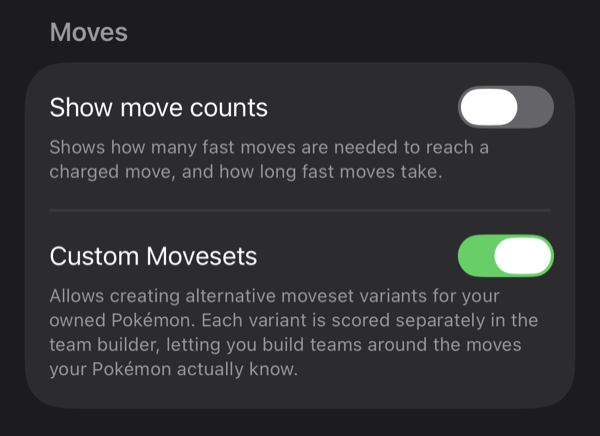
That’s it. Once enabled, you’ll see new options when managing your owned Pokémon.
Adding a moveset variant
- Go to the Your Pokémon tab and find a Pokémon you own
- Tap the gear icon (⚙️) next to its Owned badge
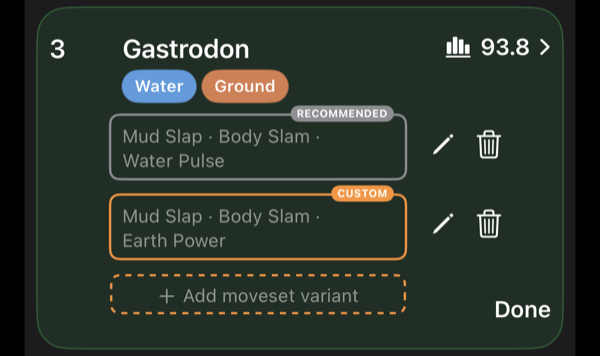
- The row expands to show your current movesets and a ”+ Add moveset variant” button
- Tap it and pick your fast move and up to two charged moves
- Tap Done
Your custom variant appears below the recommended one, marked with an orange CUSTOM label. You can add multiple variants per Pokémon and edit or delete them at any time.
What changes when you use a custom moveset
This is where it gets interesting. A custom variant isn’t just a label — the app runs full battle simulations for it against the entire meta. That means every number you see reflects the moves you actually picked, not the recommended default.
Here’s where custom movesets show up:
Team Builder (manual and automatic)
Custom variants appear as separate options when building a team. The scoring engine treats them as distinct candidates, so a Pokémon with a different charged move can score differently for the same team slot. The automatic builder tests your custom variants alongside recommended ones and picks whichever fits best.

Team Grades
Coverage, Bulk, Safety, and Consistency grades are all recalculated based on your actual moves. If your custom moveset covers a type that the recommended one doesn’t, your Coverage grade will reflect that.
Matchup breakdowns
You can compare how different variants perform side by side. The matchup breakdown shows wins, losses, and threat lists for each variant, so you can see exactly which matchups improve or get worse with a different move.

Lead Gameplans
Shield scenarios and switch recommendations account for your custom moves. If your lead runs a different charged move, the gameplan reflects the actual damage output and energy costs.
Battle Log trends
When you record opponents, the trend analysis includes your custom variants. “Weak to Your Pokémon” and corebreaker suggestions consider what your custom movesets actually beat, not just what the recommended set beats.
When to use custom movesets
Surprise factor. Running a non-standard charged move can flip matchups your opponent doesn’t expect. The app lets you verify which matchups actually change before you commit to it in battle.
Better team fit. Sometimes the highest-ranked moveset for a Pokémon isn’t the best one for your specific team. A different move might cover a shared weakness or improve synergy with your other two picks. Custom movesets let you test that directly.
Legacy or exclusive moves. If your Pokémon knows a move that’s no longer available, you can set it as a custom variant so the app accounts for what you actually have.
Good to know
- When you first enter the team builder with custom movesets, the app needs a moment to simulate matchups. You’ll see a brief “Testing your custom picks…” loading screen. Results are cached, so it’s only slow the first time.
- If your custom moveset happens to match the recommended one for the current cup, the app detects that and won’t show a duplicate.
- Custom Movesets works across all leagues and cups. Your variants are saved per Pokémon and persist across sessions.
Custom Movesets is available now on iOS and Android. Update to the latest version to get started.
Try PoGoTeams for free
Build winning PvP teams with automatic team building and lead gameplans.